How Much Is Shopify Monthly: Complete Pricing Breakdown 2026
Many business owners search for "how much is Shopify monthly," but struggle to find a clear, complete answer. Shopify pricing goes beyond a single subscription number, with plans, transaction fees, and add-ons all affecting total costs. How much does it really cost to run a Shopify store each month, and what fees often get overlooked? This guide breaks down every expense clearly and simply. Let's read on to get a full, transparent pricing breakdown!
Shopify Pricing Plans in 2026: Monthly Breakdown
Many sellers ask, "How much is Shopify monthly?" and what that price really includes. The answer depends on the plan level, billing cycle, and added costs tied to growth.
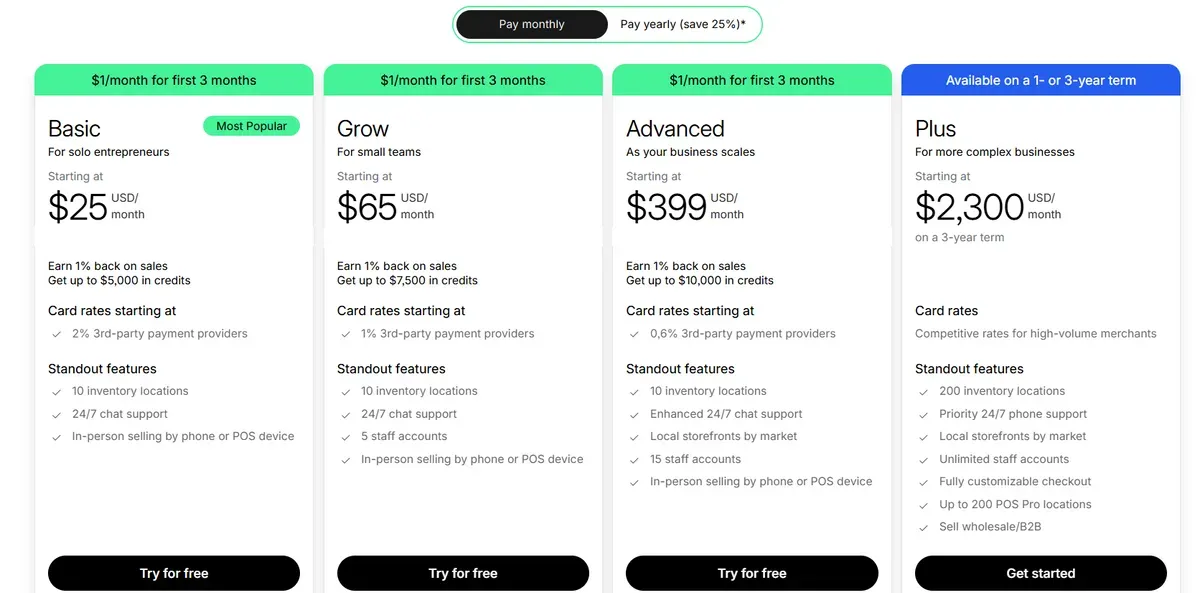
| Plan | Monthly Billing | Key Highlights | Best For |
|---|---|---|---|
| Starter | $5 | Buy links, social selling, basic order tracking | Creators and social sellers |
| Basic Shopify | $25 | Full online store, unlimited products, core tools | Solo sellers and small stores |
| Grow | $65 | Lower fees, staff accounts, stronger insights | Growing teams and steady sales |
| Advanced Shopify | $399 | Advanced reports, lower rates, market tools | Scaling and global brands |
| Shopify Plus | From $2,300 | Custom checkout, B2B, unlimited staff | Enterprise businesses |
#1. Starter Plan
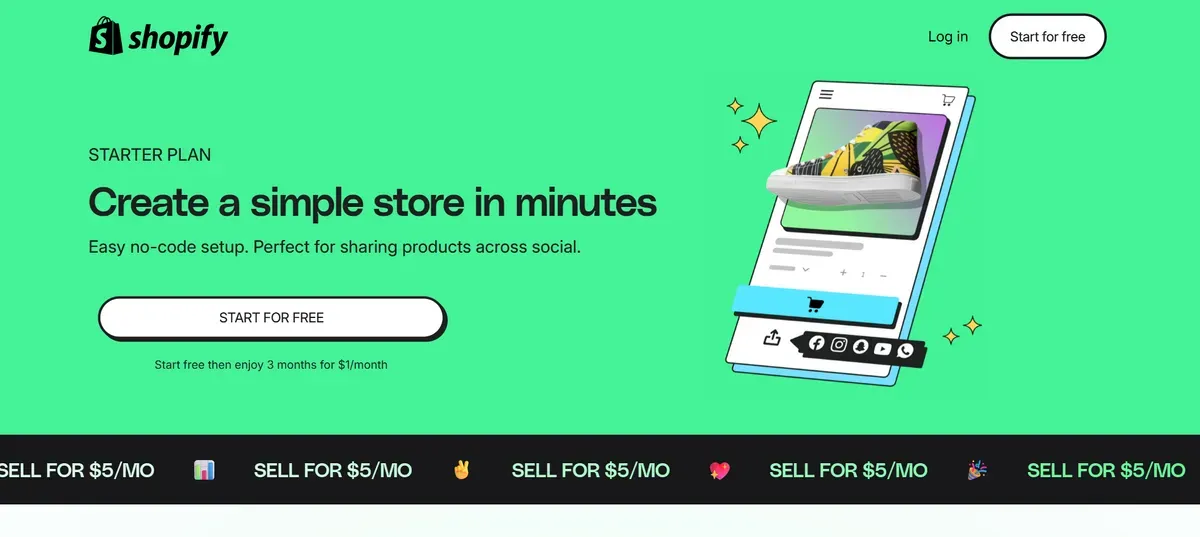
How much is Shopify monthly for Starter? The Shopify Starter Plan costs about $5 per month, making it the cheapest way to sell online with Shopify. This entry-level price stays the same each month and does not require a long-term contract. Starter focuses on simple selling tools like buy buttons and social commerce links instead of a full online store. Transaction fees of around 5% apply to every sale.
Who the Starter Plan Is For
The Starter plan suits creators and small sellers with low sales volume. It works well for people selling mainly through Instagram, TikTok, or Facebook, where a full store is unnecessary. New brands that want a low-cost way to handle payments and track orders may also choose Starter when testing how much is Shopify monthly before committing to higher plans.
Main Features
Product link checkout: Create simple buy links to share in posts, chats, and profiles.
Basic order management: Track orders and sales from the Shopify admin panel.
Social selling tools: Designed for selling through social apps like Instagram or WhatsApp.
Basic analytics: View simple sales and performance data.
Pros
Very low cost: At just $5/mo, it’s one of the cheapest ecommerce options.
Quick setup: No technical skills required; start selling quickly.
Good for social sellers: Works well for Instagram or TikTok sales.
Simple order management: Keeps track of sales in one place.
Limitations
No full online store: Doesn’t include a theme-driven website.
Higher transaction fees: Credit card fees are higher than other plans.
No staff accounts: Collaboration features are limited or missing.
Limited customization: Fewer design and branding options.
When to Upgrade to Basic Shopify
An upgrade becomes useful when branding matters more. Basic adds a website, blog, and lower fees. For sellers asking how much is Shopify monthly at scale, Starter often becomes limiting.
You can consider upgrading to Basic Shopify when you:
Need a branded website instead of just links
Want lower fees per sale for higher profit margins
Require official store features like checkout pages and blogs
Plan to add staff accounts or inventory locations
#2. Basic Shopify
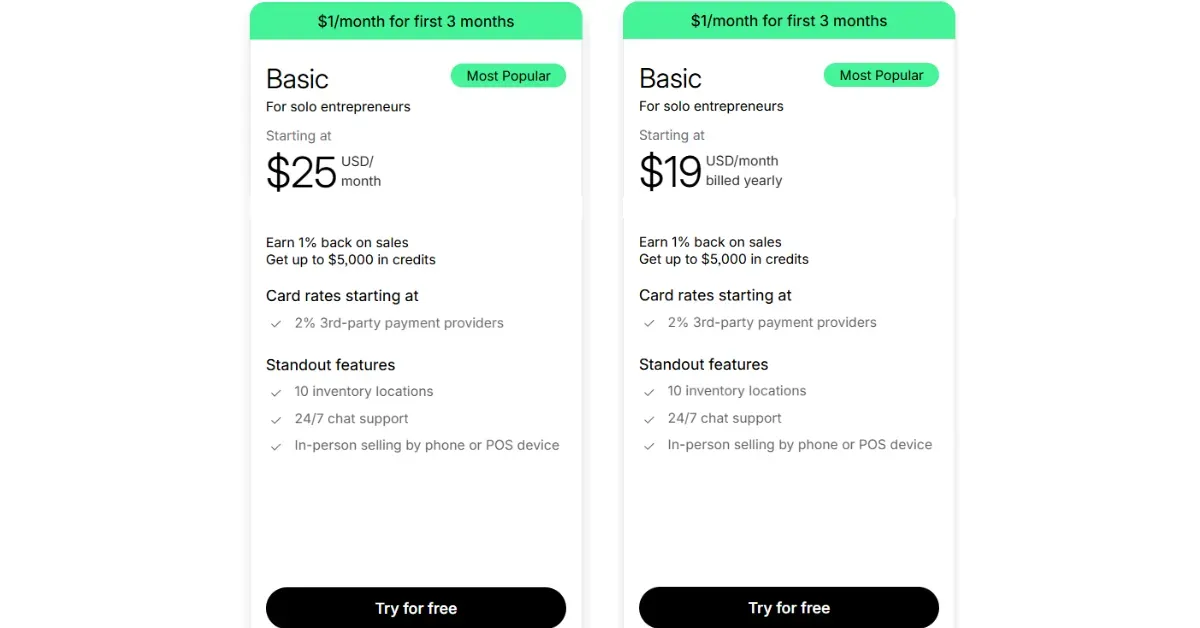
How much is Shopify monthly for Basic? The Shopify plan starts at $25 per month with monthly billing. When billed yearly, the price drops to $19 per month, which delivers a 25% savings over the monthly rate. Shopify also offers a $1 per month trial for the first three months, which helps new stores launch at low upfront costs. This plan gives access to a full online store and core e-commerce tools.
Who the Basic Plan Is For
Basic Shopify fits solo entrepreneurs and small store owners who want a complete e-commerce website. It works well for sellers who move beyond social links and need a branded storefront. This plan supports steady sales without complex operations. Many businesses start here when evaluating how much is Shopify monthly for full ecommerce.
Main Features
Full online store: Build a branded website with pages, navigation, and checkout.
Unlimited products: List and sell as many products as needed.
10 inventory locations: Manage stock across multiple locations.
24/7 chat support: Get help anytime from Shopify support.
In-person selling: Accept payments by phone or a POS device.
Pros
Low monthly cost: One of the most affordable full e-commerce plans.
Simple store setup: Easy tools for beginners and small teams.
Scales with growth: Supports unlimited products and sales volume.
Strong support access: Chat support stays available around the clock.
Limitations
Higher card rates: Starts at 2% for third-party payment providers.
No extra staff accounts: Team access stays limited at this level.
Basic reporting only: Advanced analytics require a higher plan.
Limited automation: Fewer workflow tools than upper tiers.
When to Upgrade to Grow Shopify
An upgrade to Grow Shopify makes sense when sales volume and team size increase. Grow lowers transaction costs and unlocks stronger reporting tools. It also supports better team access and operational control.
Upgrade when these needs appear:
Lower payment fees to protect margins
More staff accounts for daily operations
Stronger reports to guide growth decisions
Better tools for scaling sales
#3. Grow Plan
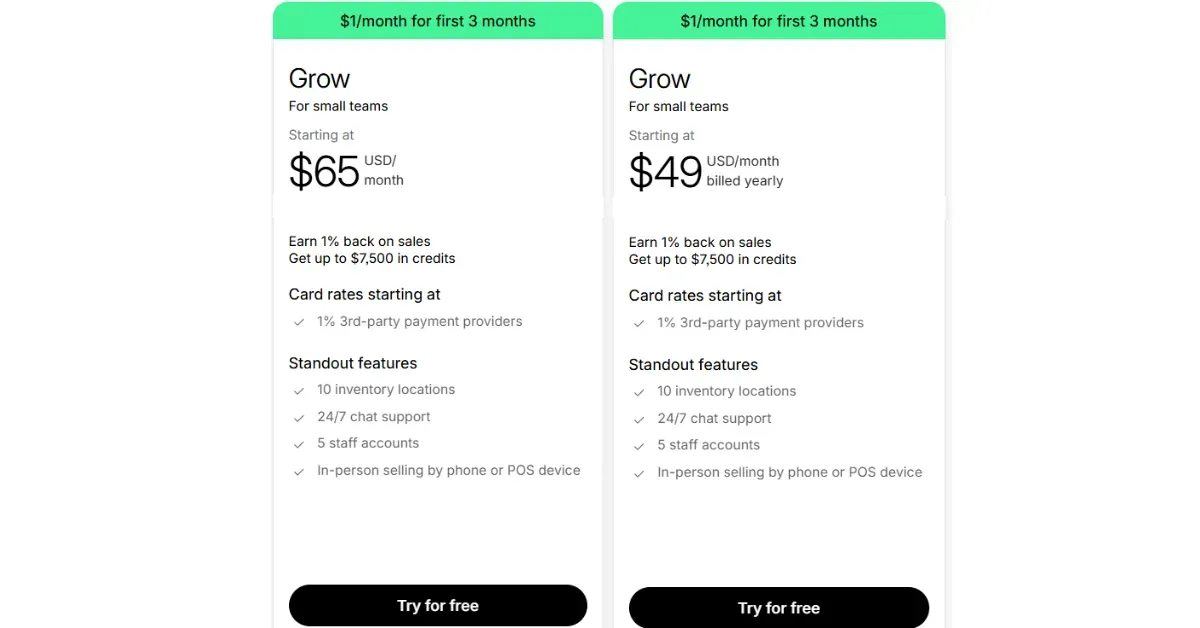
How much is Shopify monthly for Grow? The Shopify Grow plan starts at $65 per month with monthly billing. When billed yearly, the price drops to $49 per month, which reflects a 25% discount. Shopify also offers a $1 per month promotion for the first three months, which lowers early costs. Grow changes how how much is Shopify monthly impacts profit margins.
Who the Grow Plan Is For
The Grow plan suits small teams and expanding businesses with steady sales volume. It works well for stores that outgrow Basic and need more staff access and insights. This tier supports brands that manage daily orders, marketing, and customer service at scale. It also fits sellers who plan to optimize costs as revenue increases.
Main Features
Full online store: Run a complete e-commerce website with custom pages.
Unlimited products: Sell without limits on product listings.
5 staff accounts: Share store access across a growing team.
10 inventory locations: Track stock across warehouses or stores.
24/7 chat support: Get help anytime from Shopify support.
In-person selling: Accept payments via phone or a POS device.
Pros
Lower transaction fees: Card rates start at 1% with third-party providers.
More team access: Supports daily operations with multiple staff users.
Better value at scale: Costs drop as sales volume increases.
Reliable performance: Handles higher traffic and order flow smoothly.
Limitations
Higher monthly cost: More expensive than Basic Shopify.
Limited advanced reports: Deep analytics require the Advanced plan.
Automation still capped: Fewer workflow tools than higher tiers.
Not built for enterprise: Large brands may outgrow this level.
When to Upgrade to Advanced Shopify
Upgrading to Advanced Shopify becomes logical when operations grow more complex. Advanced unlocks stronger reports, lower payment rates, and better support for global selling. It also helps teams manage higher volume and multiple markets.
You can consider upgrading your Shopify store to the Advanced Shopify plan when you see the needs below:
Advanced reports for deeper sales analysis
Lower transaction fees to protect margins at scale
More staff accounts for larger teams
International selling tools for global expansion
#4. Advanced Shopify
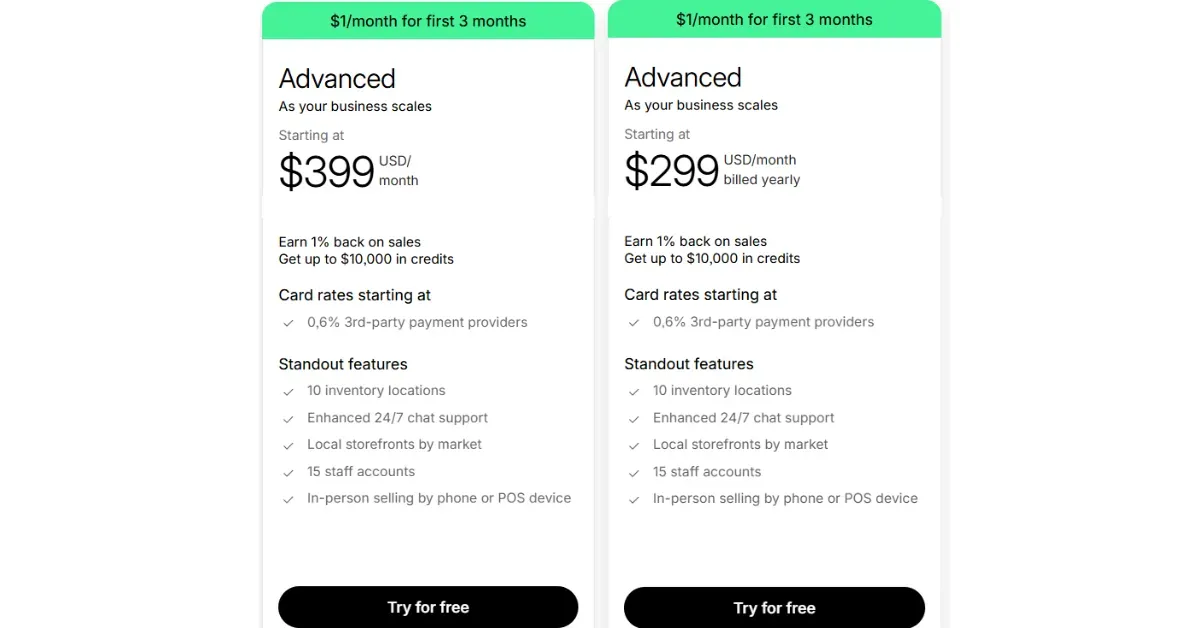
How much is Shopify monthly for Advanced? The Advanced Shopify plan starts at $399 per month with monthly billing. When billed yearly, the price drops to $299 per month, which equals a 25% discount. Shopify also offers a $1 per month deal for the first three months, which reduces early costs. This plan targets fast-growing businesses with complex operations and higher sales volume. It offers the clearest structure for businesses tracking how much is Shopify monthly at scale.
Who the Advanced Plan Is For
Advanced Shopify fits scaling businesses with large catalogs and steady traffic. It supports teams that manage multiple locations, markets, and sales channels. This plan works best for brands that rely on data to guide pricing, inventory, and growth decisions.
It also suits sellers expanding into international markets. Advanced tools help manage currencies, storefronts, and regional pricing with more control. This tier supports long-term growth without moving to enterprise plans yet.
Main Features
Advanced reports: Access detailed sales, customer, and inventory data.
15 staff accounts: Support larger teams with shared store access.
10 inventory locations: Manage stock across warehouses and stores.
Local storefronts by market: Customize pricing and content by region.
Enhanced 24/7 chat support: Faster and more specialized assistance.
In-person selling: Sell through phone or POS devices.
Pros
Lower card rates: Third-party payment rates start at 0.6%.
Powerful analytics: Data supports smarter business decisions.
International selling tools: Built for global expansion.
Strong team support: More staff access for daily operations.
High scalability: Handles heavy traffic and order volume.
Professional support level: Faster help when issues appear.
Limitations
High monthly cost: Not ideal for small or new stores.
No unlimited staff: Team size still has a cap.
Limited checkout customization: Full control requires Shopify Plus.
Overkill for simple stores: Features exceed basic needs.
When to Upgrade to Shopify Plus
An upgrade to Shopify Plus makes sense when operations reach enterprise scale. Plus supports wholesale, B2B selling, and fully customized checkout flows. It also unlocks priority phone support and higher automation limits. This move works best for brands with complex needs and large teams. Merchants reaching enterprise needs may want to compare the Advanced Shopify plan with Plus features.
Upgrade to Shopify Plus when these needs appear:
Unlimited staff accounts across departments
Fully customizable checkout for conversion optimization
Wholesale or B2B selling at scale
High-volume POS locations and advanced automation
#5. Shopify Plus
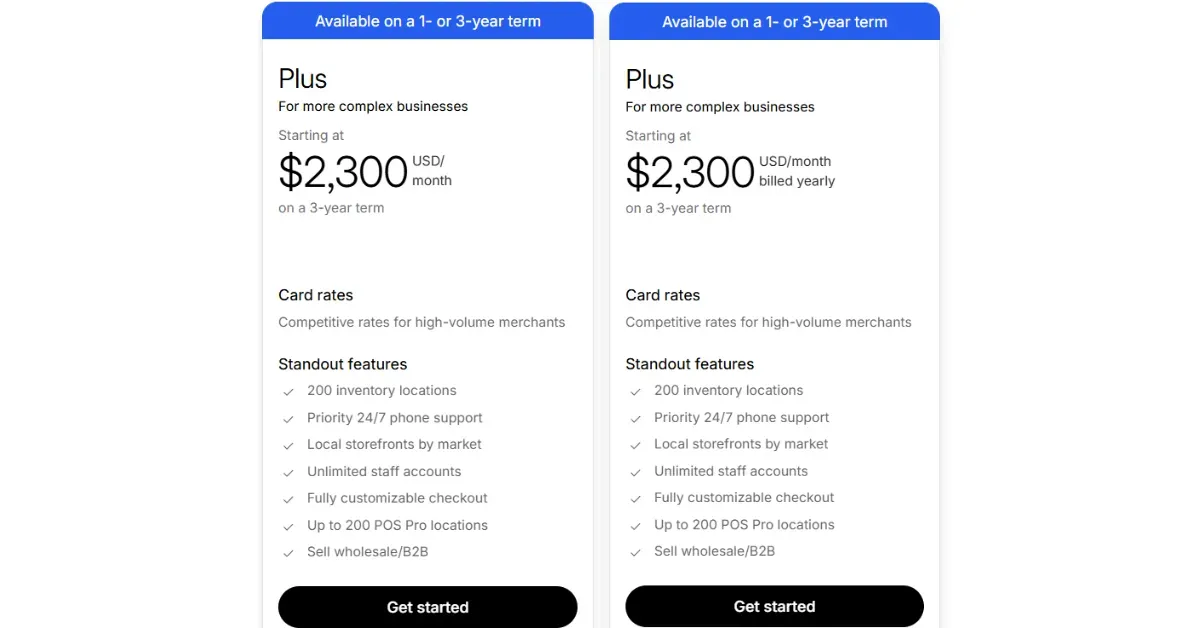
How much is Shopify monthly for Plus? Shopify Plus starts at $2,300 per month on a 3-year term. Shopify also offers 1-year contracts, with pricing set by Shopify based on business size and needs. This plan targets enterprise merchants with high sales volume and complex operations. Costs scale with features, support level, and customization needs. Shopify Plus defines how much is Shopify monthly at the highest level.
Who the Advanced Plan Is For
Shopify Plus fits large brands and enterprise sellers that run complex ecommerce operations. It supports businesses with high traffic, large teams, and advanced workflows. This plan works well for companies that sell across regions, channels, and customer types.
Plus also serves brands that need B2B and wholesale selling on the same platform. It helps teams manage custom pricing, bulk orders, and enterprise checkout needs. This tier supports long-term growth at scale. This is a strong place to reference a bulk order workflow for merchants building B2B operations.
Main Features
Unlimited staff accounts: Give full access across departments and teams.
Fully customizable checkout: Optimize checkout flows for higher conversion.
Wholesale and B2B selling: Run direct-to-consumer and B2B from one system.
Priority 24/7 phone support: Access faster help with dedicated service.
Local storefronts by market: Customize content, pricing, and currency by region.
Up to 200 POS Pro locations: Support large in-person retail operations.
Pros
Built for enterprise scale: Handles massive traffic and order volume.
Advanced customization: Greater control over checkout and workflows.
Strong automation tools: Reduce manual work across operations.
Global selling support: Designed for international brands.
Dedicated support level: Faster response and expert guidance.
Limitations
High starting cost: Not suitable for small or mid-size stores.
Contract commitment: Requires a 1- or 3-year agreement.
Complex setup: Needs technical resources for full value.
Overpowered for simple stores: Many features go unused at a lower scale.
Hidden Costs That Affect Your Shopify Monthly Budget
Before choosing a Shopify plan, you must consider hidden costs even when you know how much is Shopify monthly, as they often shape the real monthly spend. Tracking these extras provides a clearer picture of how much is Shopify monthly beyond the subscription price.
Transaction Fees and Payment Processing Costs
When you know how much is Shopify monthly, transaction fees depend on the plan and payment method. Using Shopify Payments avoids extra platform fees, but card processing still applies.
So, what are Shopify fees for a transaction? The answer is below:
| Plan | Shopify Payments Fee (US) | Third-Party Fee |
|---|---|---|
| Basic | 2.9% + 30¢ | 2% |
| Grow | 2.6% + 30¢ | 1% |
| Advanced | 2.4% + 30¢ | 0.6% |
| Plus | Custom rates | Competitive rates |
Shopify App Store Subscription Costs
Apps add features like email marketing, reviews, and subscriptions. Many apps charge $5–$50 per month, while advanced tools can exceed $100 per month. Multiple apps can raise monthly costs fast.
Premium Shopify Themes and One-Time Design Costs
Free themes exist, but premium themes cost $180–$400 as a one-time fee. Custom design work adds more cost, especially for branding or UX changes. These costs hit early but affect long-term budget planning.
Custom Development and Advanced Integration Costs
Custom features require developers or agencies. Rates often range from $50–$150 per hour in the US. Advanced integrations with ERP, CRM, or custom checkout logic increase total spend.
Domain, Email, and Third-Party Tool Expenses
Domains usually cost $10–$20 per year. Business email tools like Google Workspace cost around $6–$12 per user per month. Marketing, analytics, and shipping tools add recurring charges.
Ways to Save on Shopify Monthly Costs
Below are practical ways to help reduce how much is Shopify monthly without hurting store performance:
When you know "How much does Shopify cost per month?", match the plan to the current sales volume. Avoid paying for features that stay unused.
Annual billing cuts plan costs by about 25%. This option works well for stable stores.
Review apps each month. Cancel tools that duplicate features or add little value.
Shopify Payments removes added platform fees from third-party gateways.
Use native tools for discounts, reports, and email before adding paid apps.
Limit tools with similar functions. Fewer platforms mean lower bills.
Track fees, apps, and sales data in one dashboard.
FAQs About How Much Is Shopify Monthly
Does Shopify have hidden monthly fees?
Shopify’s base subscription is clear, but extra costs like payment processing and app subscriptions can add up beyond the plan price.
Can I cancel Shopify monthly at any time?
Yes, Shopify allows canceling your subscription at any time with no long-term contract.
How much are Shopify transaction fees monthly?
Shopify transaction fees depend on plan and payment setup; using Shopify Payments cuts extra fees, but credit card and third-party fees still apply.
Are apps included in Shopify monthly pricing?
No. Most apps cost extra and are billed separately on top of your Shopify subscription.
Is Shopify worth the monthly cost for small business?
Shopify can be worth it if its ecommerce tools and scalability match your business goals and budget.
What plan should beginners choose first?
Beginners usually start with the Starter or Basic plan to keep costs low while testing the market.
Wrapping Up
Shopify pricing depends on the plan, payment fees, apps, and added tools, not just the base subscription. The real answer to how much is Shopify monthly comes down to business size, sales volume, and feature needs. Clear cost tracking helps control profit margins and avoid surprises. Review each plan carefully, estimate hidden expenses, and match features to current goals. Take action now and choose the Shopify plan that fits the business budget today.

Hey! I'm Linda Bui. Join me as we explore tips and tutorials about Shopify apps and Shopify themes for your Shopify store.
Start Building Trust Today
Install the Product Reviews app to improve your store's credibility and boost sales with real customer reviews.
Get Started with Zero CostWhat to not miss out on our blog
Gain insightful knowledge and invaluable experiences from dedicated experts.
_1200x630.webp)
What Is Shopify Collabs? How It Works and How Brands Use It in 2026
Discover what is Shopify Collabs, how it automates affiliate tracking, and how to use it to scale influencer marketing from your dashboard. Read right now!
_1200x630.webp)
_1200x630.webp)
Newsletter
Get all the stories you need-to-know from the most powerful name in news delivered first thing every morning to your inbox