What Is Shopify Changelog? A Guide for Store Owners
- What Is a Shopify Changelog?
- How Does the Shopify Changelog Work?
- What Information Can You Find in the Shopify Changelog?
- Why Should Shopify Store Owners Follow the Changelog?
- Shopify Changelog vs. Shopify Editions: What's the Difference?
- How to Use Shopify Changelog Updates for Store Growth
- FAQs About the Shopify Changelog
- The Bottom Line
How can Shopify store owners keep up with the platform that is constantly evolving? Shopify Changelog provides a clear record of new features, improvements, changes, and fixes, which helps merchants understand what is changing and how those updates may affect their stores. By following the changelog, store owners can discover useful features, prepare for important changes, and find new ways to improve store operations and customer experience. Let's explore what Shopify changelog is and why it matters for growing Shopify stores.
What Is a Shopify Changelog?
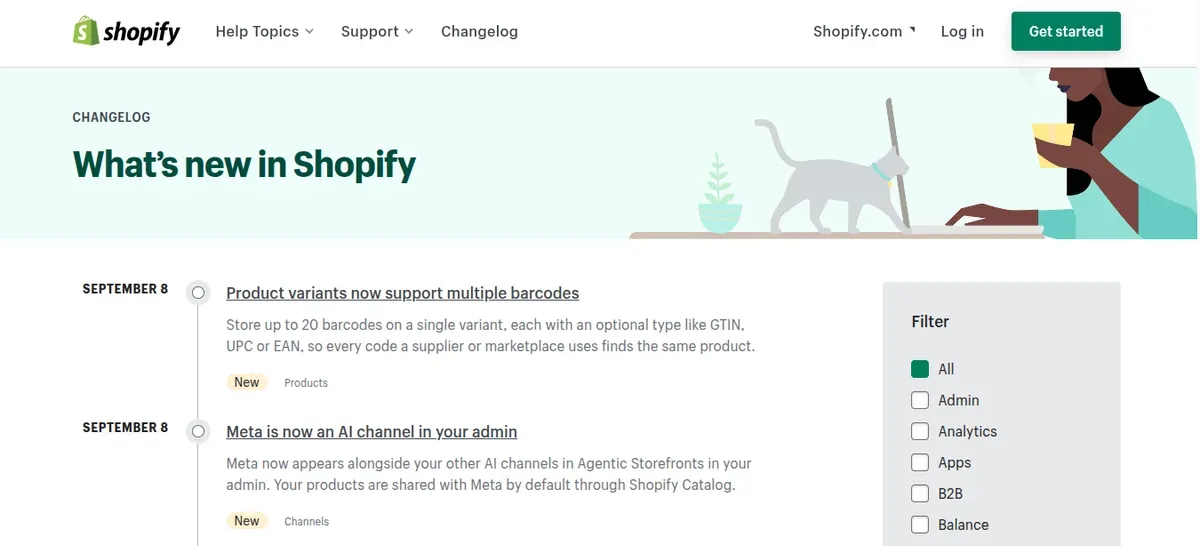
A Shopify changelog, also known as a product changelog Shopify resource, is a record of new features, product updates, improvements, and changes related to a Shopify store or the Shopify platform. Shopify maintains an official changelog that groups updates by areas such as Admin, Checkout, POS, Apps, and Analytics.
For store owners, a changelog can document important updates in one clear place, such as:
New features or tools
Store improvements and fixes
Major platform changes
Removed or changed features
Updates that may affect store operations
Shopify continues to release major updates, including 150+ updates in its Spring ’26 Edition.
How Does the Shopify Changelog Work?
Shopify changelog works as a structured Shopify update log that tracks platform updates. Each entry shows the update date, title, type, and affected Shopify area. Merchants can use it to spot new features, improvements, changes, and removals that may affect store management.
Shopify Changelog Categories and Updates
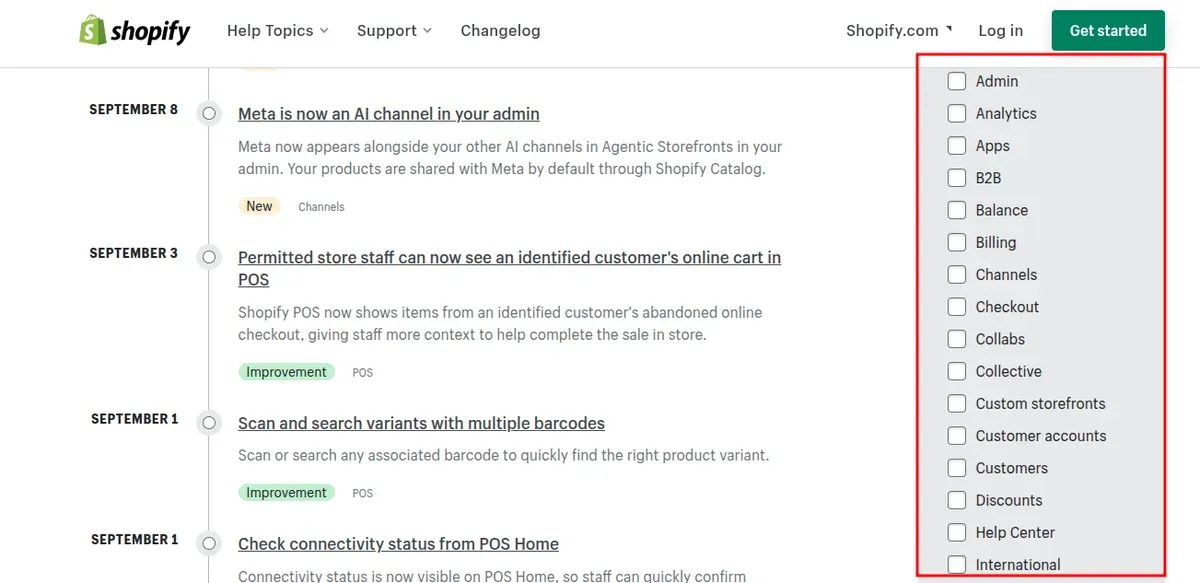
Shopify groups updates by areas such as:
Admin: New tools and changes inside Shopify Admin
Themes: Updates to themes and Liquid
POS: Changes to Shopify Point of Sale
Apps: New app features and platform changes
Analytics: Updates to reporting and data tools
Customer accounts: Changes to account and checkout features
The changelog also labels entries as New, Feature, Improvement, Changed, or Removed. For example, Shopify added multi-source collections and variant-level collections in July 2026, while also announcing changes such as the removal of certain Analytics features.
What Information Can You Find in the Shopify Changelog?
Shopify releases new features and platform changes regularly, so keeping track of them can help store owners make better decisions. The Shopify changelog brings these updates together and shows what has changed across the platform.
New Shopify Features
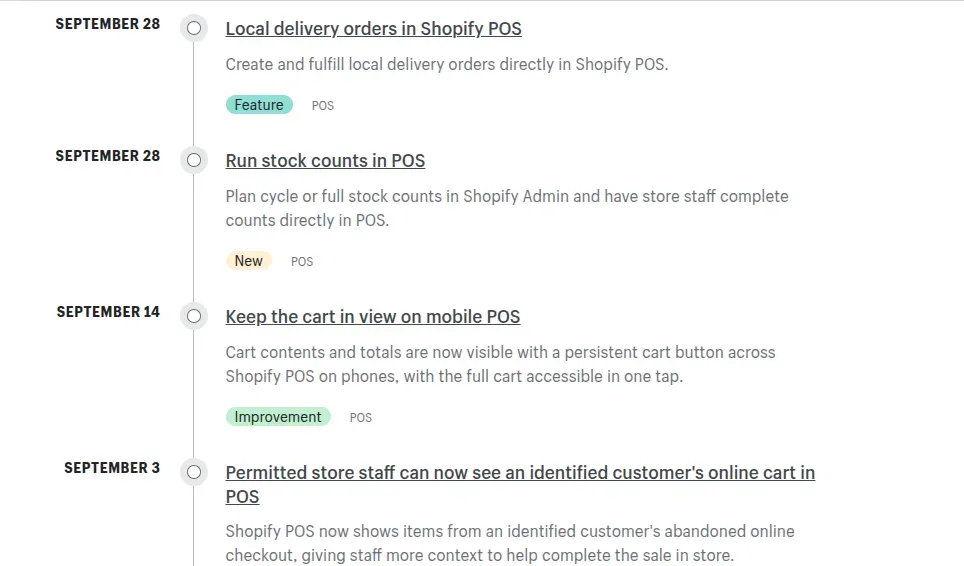
New feature entries work much like Shopify release notes, highlighting new tools and capabilities added to the platform. These updates can cover areas such as products, collections, checkout, payments, analytics, POS, customer accounts, and store management.
For example, Shopify has introduced new merchandising features that give merchants more flexibility in how they organize and present products to customers.
A feature entry may include:
The release date and affected Shopify area
A summary of the new feature
Who can access the feature
How the feature can be used in a Shopify store
Links to related Shopify documentation
Following these updates can help merchants discover useful tools early and decide whether they are worth adding to their daily store operations.
Shopify Platform Improvements
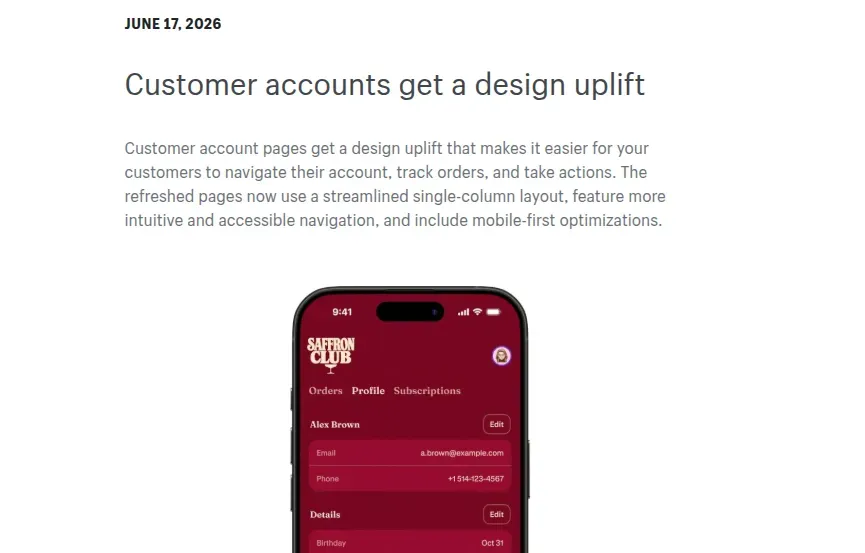
The Shopify changelog also highlights improvements to existing features and tools. These updates may make store management easier, improve the shopping experience, or give merchants more control over different parts of their stores.
For example, Shopify updated customer account pages with a simpler single-column layout, improved mobile navigation, and easier access to order details in June 2026.
Other improvements can affect areas such as themes, analytics, shipping, checkout, apps, POS, and customer accounts. Checking these updates regularly can help merchants identify changes that may save time, simplify workflows, or improve the customer experience.
Shopify Feature Changes and Removals
Not every changelog entry introduces something new. Shopify also uses the changelog to announce changes to existing features, including updates, replacements, and removals.
These notices are useful because some changes may affect how merchants manage their stores or use certain Shopify tools. Reviewing them early gives store owners more time to understand what is changing and adjust their workflows if necessary.
For example, a feature may be replaced by a newer Shopify tool, moved to a different area of the Admin, or updated with new settings and requirements. Merchants can use the changelog to stay aware of these changes and avoid unexpected disruptions to their store operations.
Why Should Shopify Store Owners Follow the Changelog?
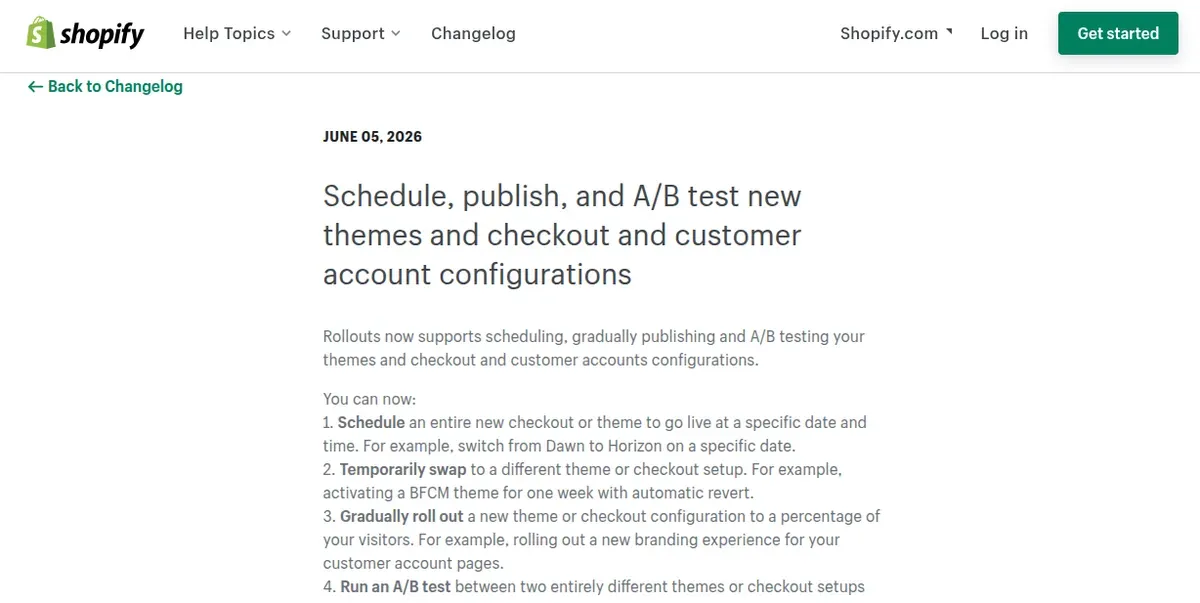
A changelog for ecommerce can help store owners track platform changes and make timely decisions. Shopify stores can change quickly as the platform adds features, improves existing tools, and retires older functions. By following the changelog, merchants can identify useful updates while preparing for changes that may affect existing store workflows.
Discover New Shopify Features Early
The Shopify changelog gives store owners a direct view of new features as Shopify releases them. Checking these updates regularly can help merchants discover tools that improve the shopping experience, simplify store management, or create new opportunities for growth.
For example, Shopify introduced Rollouts in 2026, allowing eligible merchants to schedule, gradually release, and A/B test themes and checkout or customer account configurations.
Tracking new releases can help merchants:
Improve the customer experience
Test new store features
Simplify daily tasks
Explore new sales and marketing opportunities
Make better use of Shopify’s built-in tools
Keep Your Shopify Store Up to Date
Shopify continuously improves areas such as Admin, checkout, analytics, customer accounts, POS, and apps. Following the changelog helps merchants understand what has changed and whether a new feature or improvement is relevant to their store.
For example, Shopify regularly publishes updates related to product management, discounts, customer accounts, analytics, and order workflows on its official changelog.
Reviewing these changes can help store owners avoid missing useful functionality and take advantage of improvements as they become available.
Prepare for Important Feature Changes
Not every Shopify update adds something new. The changelog uses labels such as New, Feature, Improvement, Changed, and Removed to show the type of update:
New: Introduces something that was not previously available.
Feature: Highlights a new or expanded Shopify capability.
Improvement: Enhances an existing feature, tool, or workflow.
Changed: Modifies how an existing feature works and may require workflow adjustments.
Removed: Retires a feature or option that merchants can no longer use.
The Changed and Removed labels deserve extra attention because they can affect existing store workflows, settings, apps, or team processes. A feature change may alter how a task works, while a removal may require merchants to find another way to complete the same task.
When you see a Changed or Removed update, use this checklist:
Check what changed: Read the full changelog entry and note the affected feature, date, and scope.
Identify affected workflows: Check if the change affects daily tasks, store settings, apps, integrations, or team processes.
Review dependencies: Look for apps, automations, APIs, or custom code that rely on the affected feature.
Test the new workflow: Try the updated process before making it part of regular store operations.
Find an alternative: For removed features, check Shopify's recommended replacement or available alternatives.
Inform the team: Tell relevant team members about changes that affect their tasks.
For example, Shopify announced in May 2026 that the Compare to Benchmarks toggle in Shopify Analytics would be removed later that month. A changelog entry like this gives merchants time to review how they use the feature and adjust their reporting workflow before it disappears. Following these notices can help reduce unexpected disruptions and make store updates easier to manage.
Improve Store Operations
The Shopify changelog can also help merchants identify improvements that make everyday store management easier.
For example, Shopify introduced inventory adjustment tracking that records who changed inventory, when the change happened, and by how much. It has also released updates to search, filters, POS workflows, customer accounts, and analytics.
By reviewing updates regularly, merchants can identify tools that save time, simplify repetitive tasks, and give them better visibility into store activity.
How to Follow the Shopify Changelog
The easiest way to stay informed is to visit the official Shopify changelog regularly. The page lists updates by date and labels them by area, such as Admin, POS, Analytics, Apps, Checkout, and Customer accounts.
Store owners do not need to review every update. Instead, they can focus on the categories that are most relevant to their business.
A simple routine is to:
Check the Shopify changelog regularly for recent updates
Focus on areas that affect your store, such as checkout, products, analytics, POS, or customer accounts
Open relevant updates to understand what has changed and whether any action is needed
Review Shopify Editions for a broader overview of major releases; for example, Shopify’s Spring ’26 Edition grouped more than 150 updates together.
Share important updates with team members who manage related areas of the store
Shopify Changelog vs. Shopify Editions: What's the Difference?
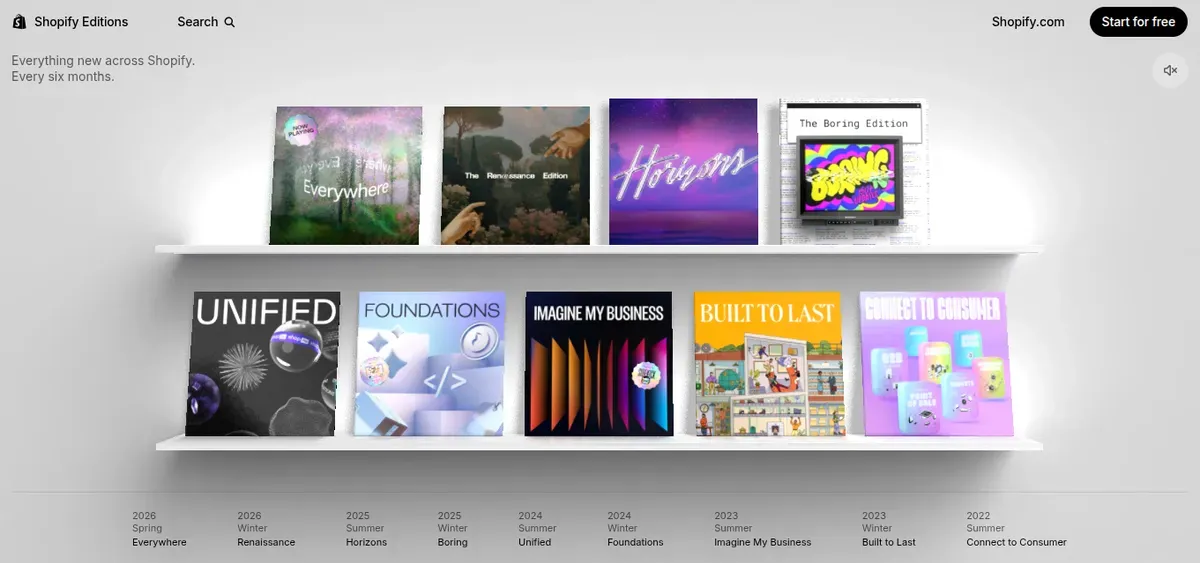
Both resources help Shopify merchants stay informed, but they serve different purposes. The Shopify changelog provides ongoing, detailed updates, while Shopify Editions groups major product releases into larger seasonal collections. Shopify states that Editions arrive every six months, while the changelog lists individual updates as they launch.
| Criteria | Shopify Changelog | Shopify Editions |
|---|---|---|
| Purpose | Track individual Shopify updates | Present major updates as a broader release |
| Target audience | Merchants, developers, and partners | Merchants, developers, and business teams |
| Update frequency | Ongoing throughout the year | Every six months |
| Information covered | Features, improvements, changes, and removals | Major product launches and grouped improvements |
| Scope of updates | Specific and detailed | Broad and strategic |
| Action required | May require immediate review or action | Usually helps with planning and discovery |
| Best use case | Monitoring day-to-day platform changes | Reviewing major Shopify developments |
| Best for | Ongoing store and integration management | Strategic planning and feature discovery |
How to Use Shopify Changelog Updates for Store Growth
Shopify changelog updates can do more than keep a store informed. They can help you discover useful features, improve the shopping experience, and find simpler ways to manage your store. Here are practical ways to turn changelog updates into growth opportunities:
Improve Your Store's Customer Experience: Review new features that can make shopping easier or more engaging. For example, Shopify’s 2026 customer account updates improved mobile navigation, order details, and access to order actions.
Improve Store Operations: Look for updates that reduce manual work or improve daily tasks. Shopify continues to add operational improvements across Admin, POS, analytics, and other areas.
Review Your Shopify App Stack: Check changelog updates against installed apps and integrations. New Shopify features may replace an existing app, while platform changes may require an app update or configuration change.
FAQs About the Shopify Changelog
Where can I find the Shopify changelog?
You can find the official Shopify changelog at Shopify’s dedicated Changelog page. It lists recent updates across areas such as Admin, POS, Checkout, Analytics, Apps, and more.
How often does Shopify update its changelog?
Shopify updates the changelog throughout the year as new features, improvements, and changes become available. Recent September 2026 entries include multiple POS and product updates, showing that updates can appear several times within a month.
Do Shopify changelog updates require action?
Not always. Some updates become available automatically, while others may require configuration, testing, or code changes. For example, a September 2026 POS update required merchants to enable a specific permission, while another connectivity update required no action.
The Bottom Line
A Shopify changelog helps you stay informed as Shopify adds features, improves tools, and changes platform requirements. By checking updates regularly, you can spot useful opportunities, prepare for required changes, and keep your store running smoothly. You can also use the updates to improve the shopping experience, simplify daily tasks, and make better use of Shopify's features. Ready to make platform updates part of your store growth strategy? Start checking the Shopify changelog regularly and turn new updates into practical improvements.

Hey! I'm Linda Bui. Join me as we explore tips and tutorials about Shopify apps and Shopify themes for your Shopify store.
Start Building Trust Today
Install the Product Reviews app to improve your store's credibility and boost sales with real customer reviews.
Get Started with Zero CostWhat to not miss out on our blog
Gain insightful knowledge and invaluable experiences from dedicated experts.
_1200x630.webp)
Best Shopify Wishlist Apps: Let Customers Save What They Love
Need a Shopify wishlist app for your store? Let's compare 7 leading options for 2026 and find the right mix of features, pricing, alerts, and integrations.
_1200x630.webp)
_1200x630.webp)
Newsletter
Get all the stories you need-to-know from the most powerful name in news delivered first thing every morning to your inbox