How to Migrate Customer Data from WordPress to Shopify Smoothly?
- Why Migrating Customer Data from WordPress to Shopify Matters
- What Can and Can’t Be Migrated from WordPress to Shopify
- Preparations Before Migrating Customer Data
- Step-by-Step Process to Migrate Customer Data from WordPress to Shopify
- Best Apps to Migrate Customer Data from WordPress to Shopify
- Common Migration Challenges and How to Fix Them
- Best Practices for a Smooth Customer Data Migration
- FAQs about How to Migrate Customer Data from WordPress to Shopify
- Final Thoughts
Migrating stores often raises one critical concern: what happens to existing customer data? When moving platforms, preserving accounts, emails, and purchase history is essential for business continuity. This guide explains how to migrate customer data from WordPress to Shopify in a clear way, while minimizing errors and downtime. From preparation to validation, each step focuses on accuracy and security, helping stores transition with confidence. Explore the full process and follow the proven steps to migrate customer data smoothly!
Why Migrating Customer Data from WordPress to Shopify Matters

Wondering why so many businesses learn how to migrate customer data from WordPress to Shopify before making the switch? Moving an online store from WordPress (usually with WooCommerce) to Shopify is more than a platform update. It affects daily operations, customer trust, sales continuity, and long-term growth. Accurate customer data transfer keeps revenue steady and prevents costly errors after launch.
Here are key reasons this migration matters:
Preserve customer experience: Keeping account details, saved addresses, and order history intact helps returning buyers feel at home on the new platform.
Maintain business continuity: Correct data migration ensures sales processes, marketing lists, and loyalty programs stay functional without interruption.
Protect SEO and traffic: Proper handling of redirects and metadata maintains search visibility, avoiding drastic drops in organic visits.
Ensure data accuracy: Shopify’s structure demands precise mapping of fields; this prevents errors that lead to wrong orders or support issues.
Comply with privacy rules: Handling customer data carefully during transfer helps meet legal standards like GDPR or CCPA, reducing risk.
What Can and Can’t Be Migrated from WordPress to Shopify
Before learning how to migrate customer data from WordPress to Shopify, it helps to know what data will travel and what won’t. Shopify and WordPress store content in very different ways, so some items transfer smoothly while others require a rebuild or replacement.
What can be migrated:
Products and Inventory: All product details, SKUs, prices, stock levels, and variants can move into Shopify.
Customer Data and Orders: Emails, names, addresses, and order history can be imported, though login passwords won’t transfer.
Blog Posts and Pages: Blog content, pages, and related text can be migrated into Shopify’s CMS.
Navigation and Basic Settings: Menu structures and simple settings can be recreated in Shopify and retain site flow.
SEO Metadata & Redirects: Titles, descriptions, image alt text, and URL redirects can be preserved with tools or apps.
What can't be migrated:
WordPress Themes and Design: Theme templates and design files won’t work in Shopify and must be rebuilt.
Plugins & Custom Code: WordPress plugins and PHP scripts cannot run on Shopify; replacements must be found via Shopify apps.
Customer Passwords: Passwords remain encrypted and won’t transfer, forcing users to reset.
Advanced Custom Fields: Special WordPress content types and shortcodes won’t map directly and need manual work.
Server-Side Scripts: Backend scripts used in WordPress won’t operate on Shopify because of platform differences.
These little reminders shape the strategy for how to migrate customer data from WordPress to Shopify without surprises.
Preparations Before Migrating Customer Data

Preparation plays a major role in how to migrate customer data from WordPress to Shopify safely. Skipping early steps often leads to missing records or import errors.
Choose the Right Migration Method
Decide how the data will move. Options include using CSV export/import, Shopify’s built-in tools, migration apps, or a third-party service. Each method has pros and cons for time, cost, and accuracy.
Backup All WordPress Data
Create full backups of the WordPress database, media, and files before exporting customer data. Secure backups protect against data loss and provide a restore point if anything goes wrong. Use plugins or hosting tools to export everything securely.
Prepare Customer CSV Files
Before you apply the steps on how to migrate customer data from WordPress to Shopify, remember to export customer data from WordPress using the correct tool or plugin. Then open the file and format it to match Shopify’s required columns and structure. Accurate headers and clean entries prevent import errors.
Clean and Verify Customer Records
Check for duplicates, missing fields, or inconsistent entries before importing. Fix issues like broken emails or missing addresses in the CSV. Clean data helps Shopify process customer accounts more reliably.
Plan for Password Handling
Passwords do not transfer from WordPress to Shopify due to encryption differences. Prepare a plan for customer password resets after migration so customers can log in without frustration.
Step-by-Step Process to Migrate Customer Data from WordPress to Shopify
Moving customer records needs a clear and structured workflow. The steps below explain how to migrate customer data from WordPress to Shopify with fewer errors and better control:
Step 1: Export Customer Data from WordPress
WordPress stores customer details inside the eCommerce plugin, most often WooCommerce.
Access the WordPress admin dashboard.
Go to WooCommerce and select Customers.
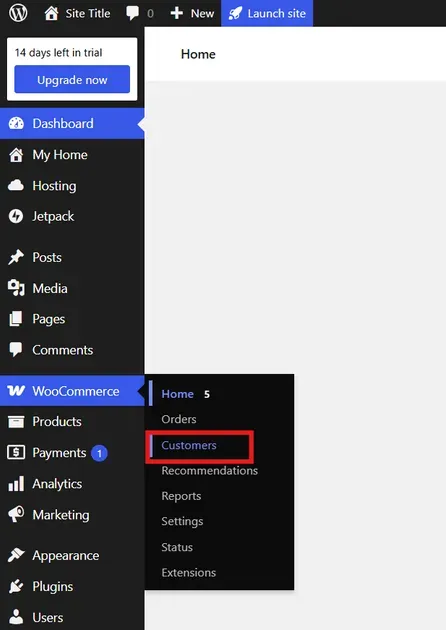
- Click Download to download the customer data as a CSV file and save it locally.
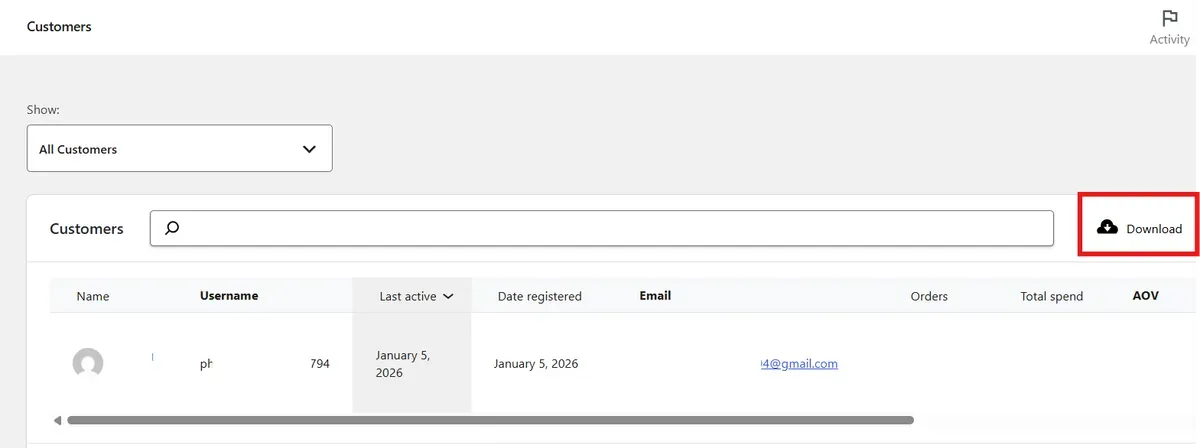
This file usually includes names, email addresses, billing details, and order history.
Step 2: Prepare the Data for Shopify
Open the exported CSV file in Excel or Google Sheets.
Review all rows and fill in missing details such as names or email addresses.
Remove plugin-specific columns that Shopify does not support.
Save the cleaned file as a CSV.
Step 3: Import Customer Data into Shopify
Sign in to the Shopify admin panel.
Select Customers to check customer-related options.
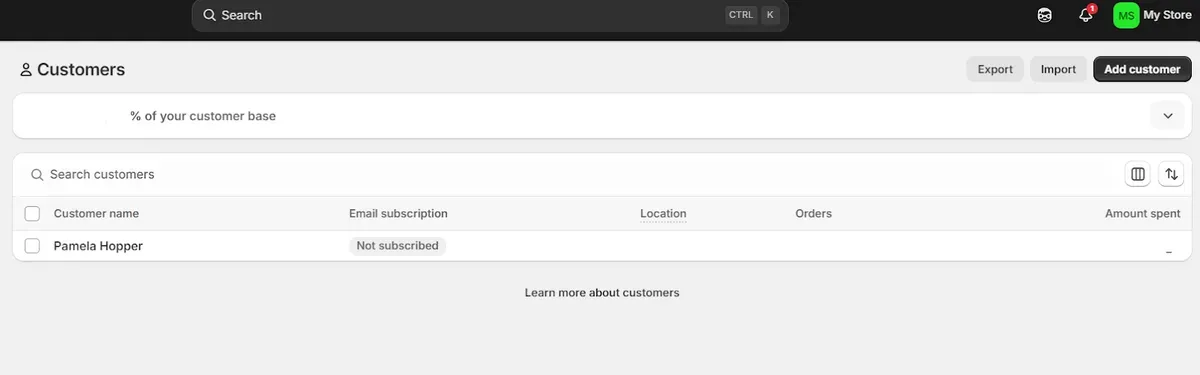
Make sure the current Shopify plan allows customer data imports.
Click Import.
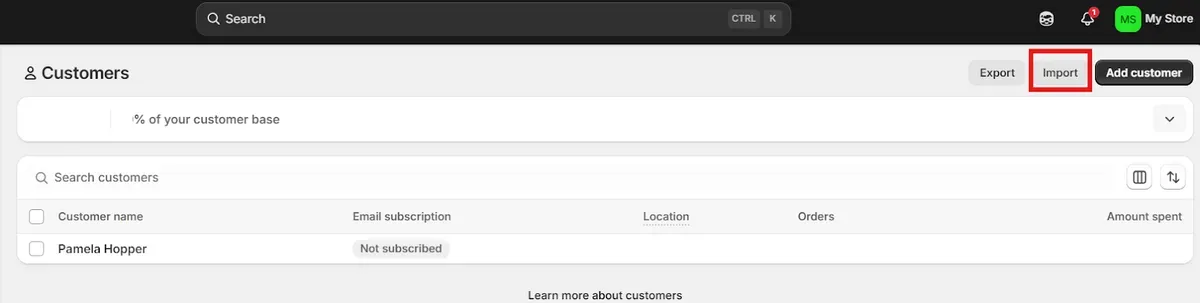
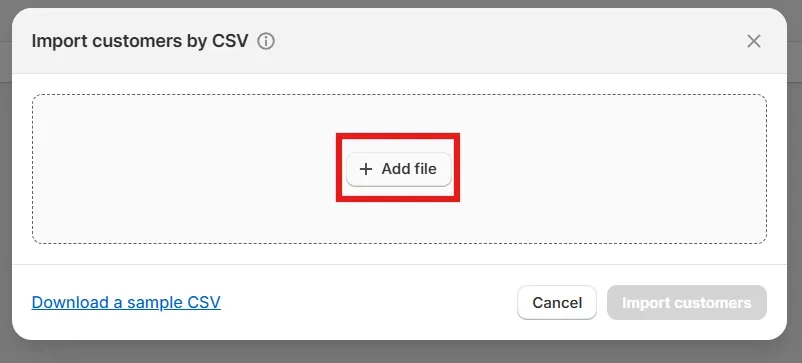
- Click Add file to import the CSV file you've downloaded above.
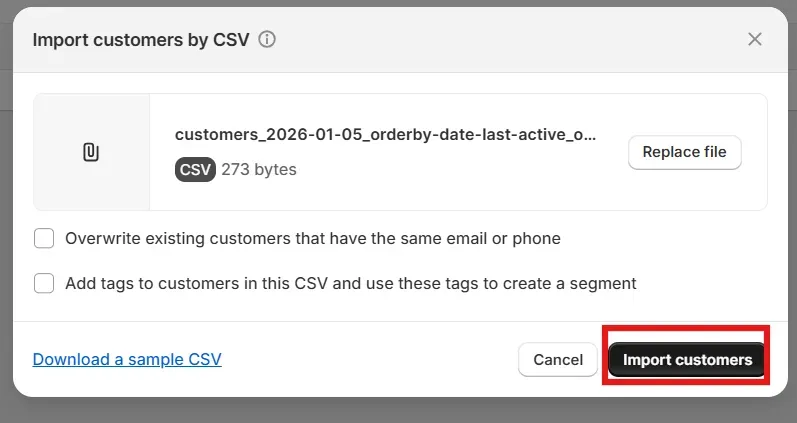
- Click Import customers. That's all the key steps for how to migrate customer data from WordPress to Shopify.
Step 4: Test the Migration
After the import finishes, confirm that all records appear correctly.
Open the Customers section in the Shopify dashboard.
Check customer profiles to verify names, email addresses, and related details display as expected.
Review a few accounts to confirm order history or any additional migrated data.
Now, you know how to migrate customer data from WordPress to Shopify!
Best Apps to Migrate Customer Data from WordPress to Shopify
The right tools simplify how to migrate customer data from WordPress to Shopify and reduce manual effort. Below are some of the best Shopify apps to migrate customer data from WordPress to Shopify with reliable features and clear benefits.
Matrixify
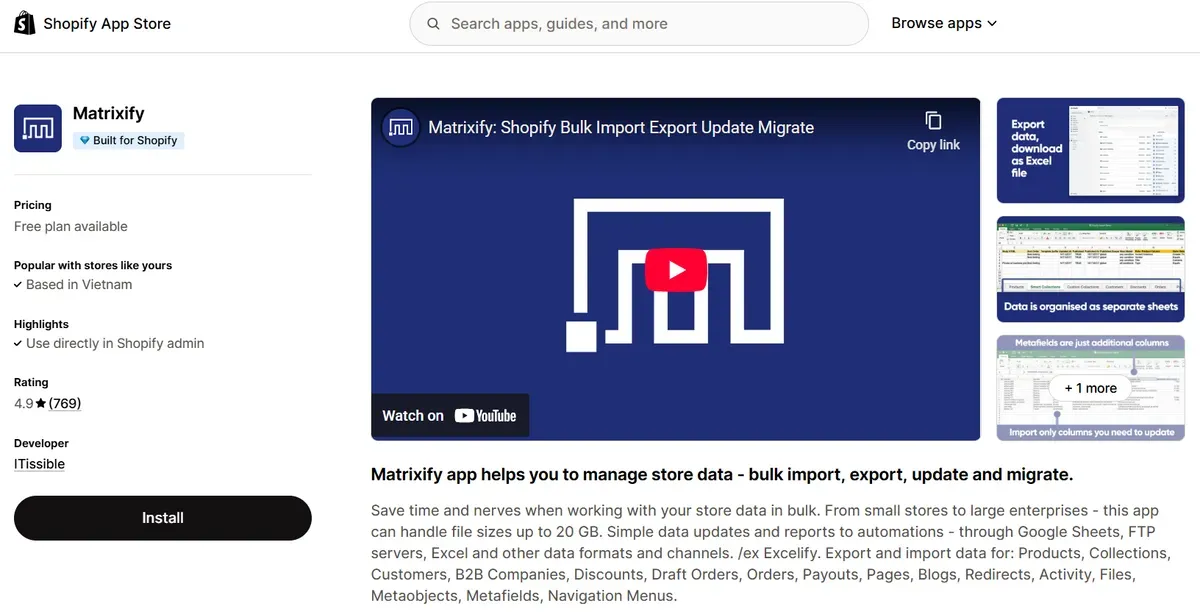
Matrixify is a powerful bulk data app built for Shopify stores with medium to large data volumes. It can import and export many types of data, including customers, orders, products, pages, blog posts, and custom metaobjects. The app works with large CSV or Excel files and supports data migration from platforms like WooCommerce, BigCommerce, and others. Users can preview and adjust data before learning how to migrate customer data from WordPress to Shopify for more control.
Key features:
Bulk import/export of customers, orders, and more
Supports large file sizes and complex data types
Works with Excel, CSV, and Google Sheets
Scheduled import/export jobs and automation options
Migrate Go: Import & Export
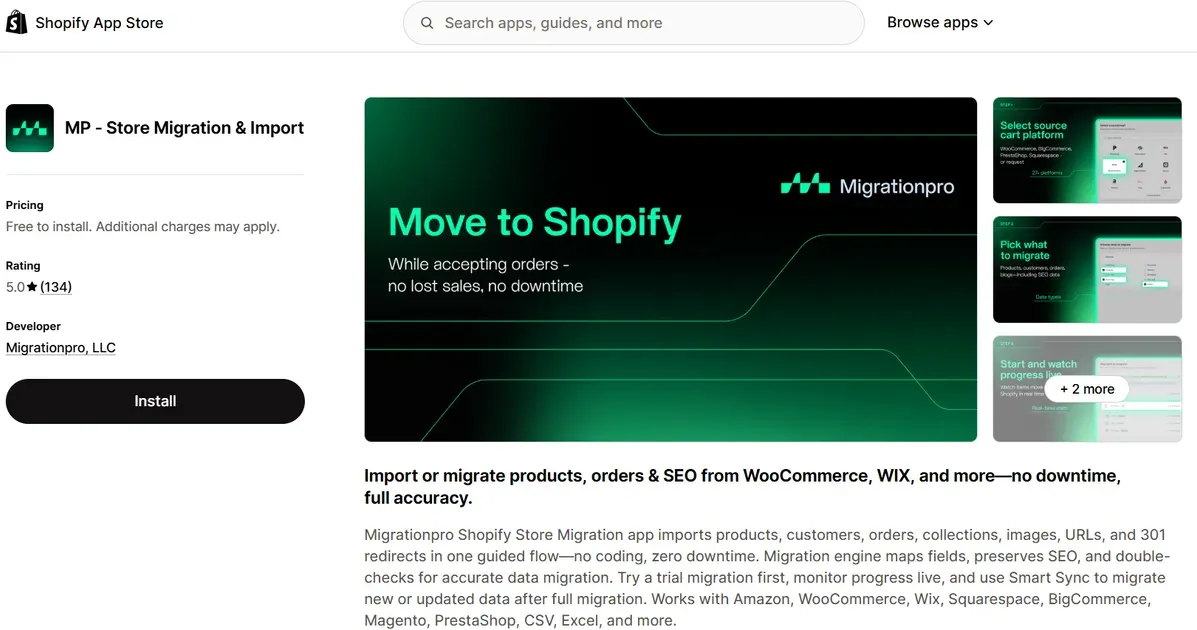
Note: MP ‑ Store Migration & Import (MigrationPro) has been delisted from the Shopify App Store ("This app is not currently available"), so it's replaced here with Migrate Go: Import & Export, a comparably affordable migration app rated 4.8 stars across 21 reviews. It guides store owners through migrating customers, orders, products, and collections with an easy, no-code setup, making it a good choice for merchants moving from WooCommerce and other platforms.
Key features:
Bulk import/export and update of products, collections, customers, and orders
Custom field mapping between WooCommerce and Shopify
Preserves SEO data during migration
Free plan for up to 25 items per entity, with paid plans starting at $14.99/month for larger stores
AppsByB: WooCommerce Importer
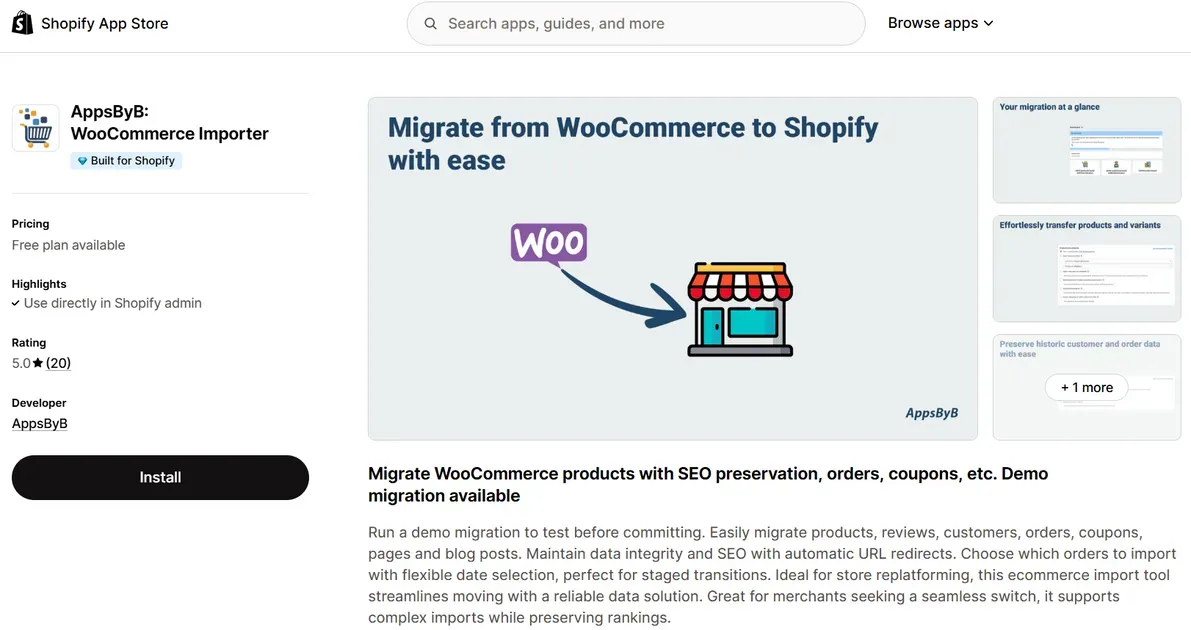
AppsByB: WooCommerce Importer simplifies WordPress to Shopify migration by importing products, customers, orders, coupons, pages, and blog posts. The tool creates SEO-friendly redirects and lets store owners choose which orders to import. It’s ideal for staged migration plans. A demo option helps test results before fully committing.
Key features:
Migrate customers, orders, and related content
Automatic SEO URL redirects
Flexible order selection during import
Demo migration for testing before full run
Common Migration Challenges and How to Fix Them
Even with planning, issues can appear during how to migrate customer data from WordPress to Shopify. Knowing common issues and clear fixes helps keep the move stable and predictable.
Preserving SEO Rankings
SEO often suffers when URLs, metadata, or site structure change. Search engines may lose track of pages if redirects are missing.
Fix: Set up 301 redirects from old WordPress URLs to new Shopify pages. Update meta titles and descriptions, submit a new sitemap, and track results in Google Search Console.
Balance of Features and Functionality
WordPress relies heavily on custom plugins and flexible functions. Shopify uses a different app ecosystem, which can limit direct feature matching.
Fix: Review Shopify apps carefully and match them to business needs. For unique features, work with Shopify developers to build custom solutions.
Theme Transition and Design
WordPress themes do not work on Shopify due to different code systems. Branding may break during redesign.
Fix: Choose a flexible Shopify theme and customize it. For unique layouts, hire a Shopify specialist to build a custom theme that works on all devices.
Data Transfer Issues
WordPress and Shopify use different data formats. Products, customers, and orders may not map cleanly.
Fix: Use Shopify Importer or trusted migration apps. For large or complex stores, expert support ensures accurate field mapping.
Best Practices for a Smooth Customer Data Migration

Here are some practical steps to make sure your process on how to migrate customer data from WordPress to Shopify goes smoothly and without surprises:
Test on a Staging Store First
Always run your migration on a staging or test store first. This lets you spot formatting issues, missing fields, or customer data mismatches before anything goes live. Testing early helps catch problems without affecting real customers or live sales data.
Staging environments also let you try different migration tools and settings to see what works best for your store size and data type.
Notify Your Customers About the Change
Let customers know ahead of time that their account information will move to a new platform. Clear communication builds trust and reduces confusion when they log in after the switch.
Include instructions about resetting passwords if that step is required, and explain any changes to their login process or account management.
Keep Backups of Original Export Files
Always back up your original export files before starting the import. Store multiple copies in different locations, like cloud storage, external drives, or secure servers. These backups act as safety nets if something goes wrong during the data transfer, letting you restore the original information quickly.
FAQs about How to Migrate Customer Data from WordPress to Shopify
Can I migrate only customer data without products or orders?
Yes. Shopify import tools and most migration apps allow selective imports, including customers only. This option works well for phased migrations.
Will customer passwords move to Shopify?
No. Shopify cannot import encrypted passwords from WordPress or WooCommerce. Customers must reset passwords after migration.
Do I need to format the CSV manually?
Sometimes. Shopify requires specific column headers and data structure for customer imports. Many apps handle formatting automatically.
What if my customer data includes custom fields?
Custom fields do not map by default. Migration apps or tools like Matrixify can import custom data into Shopify metafields.
What happens if I import duplicate customers?
Shopify may create duplicate records if emails differ. Many migration apps detect duplicates and merge or skip them.
Can I automate future customer syncs?
Yes. Some migration apps support scheduled syncs or Smart Sync features. This helps keep data updated during long migrations.
How do I handle customer groups/tags?
Shopify uses tags instead of groups. Customer segments can be recreated using tags after import.
Final Thoughts
Understanding how to migrate customer data from WordPress to Shopify helps protect customer trust, sales history, and long-term growth. With clear preparation, the right tools, and careful testing, the migration process stays controlled and predictable. A structured approach reduces risks and avoids data loss during platform changes. Follow the outlined steps, apply best practices, and choose reliable apps to support the move.

Hey! I'm Linda Bui. Join me as we explore tips and tutorials about Shopify apps and Shopify themes for your Shopify store.
Start Building Trust Today
Install the Product Reviews app to improve your store's credibility and boost sales with real customer reviews.
Get Started with Zero CostWhat to not miss out on our blog
Gain insightful knowledge and invaluable experiences from dedicated experts.
_1200x630.webp)
Best Shopify Wishlist Apps: Let Customers Save What They Love
Need a Shopify wishlist app for your store? Let's compare 7 leading options for 2026 and find the right mix of features, pricing, alerts, and integrations.
_1200x630.webp)
_1200x630.webp)
Newsletter
Get all the stories you need-to-know from the most powerful name in news delivered first thing every morning to your inbox